MODEL REFERENCE
Brother FAX-575/FAX-575e
15 errors · 12 troubleshooting topics
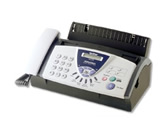
The checks and guides below come from the official manuals for this model.
No matches for this wording. Try a light name, error code or a shorter phrase.
Errors and messages
Shown on the machine display CHECK PAPER RELOAD PAPER PRESS STOP KEYpaper is missing or loaded incorrectly
Paper is missing or loaded incorrectly: Reload the paper tray, set the guides to the paper size, and retry.
COVER IS OPEN CLOSE COVERa cover is open
Close the indicated cover completely and clear any paper behind the rear cover.
DOCUMENT JAM REMOVE JAM PRESS STOP KEYdocument jam
Document jam: Remove the jammed document and scraps from the feeder, then reload the document.
DR MODE IN USEdistinctive Ring is active
Turn Distinctive Ring off before changing the receive mode.
LINE DISCONNECTthe fax call ended
Try sending or receiving the fax again.
MEMORY NEAR FULL CLEAR MEMORYmemory is full
Finish or cancel the current job, print or clear stored faxes, and retry.
NOT REGISTEREDnumber is not registered
Program the One-Touch or Speed-Dial entry before using it.
OUT OF MEMORY CLEAR MEMORYmemory is full
Finish or cancel the current job, print or clear stored faxes, and retry.
PAPER JAM PLS OPEN COVER REMOVE JAMpaper jam
Open the indicated path, remove the jammed paper carefully, and close the covers before retrying.
PHONE LINE BUSYfax number is busy or unanswered
Verify the number and place the call again.
POLLING FAILEDpolling failed
Check the other fax machine's polling setup and try again.
PRINTHEAD OVERHEATED WAIT TO COOLprint head is overheated
Wait for the print head to cool before sending another job.
RECEIVE FAILEDfax reception failed
Retry the fax and ask the telephone company to check the line if the error repeats.
RIBBON EMPTY RESET OR REPLACEribbon needs replacement
Install the print cartridge correctly or replace the empty ribbon.
MEMORY DISABLED UNABLE TO INIT UNABLE TO PRINT UNABLE TO SCANmechanical fault
Protect any stored faxes, restart the machine, and contact Brother if the fault remains.
Troubleshooting
Find the problem you are experiencingCondensed print and white streaks across the page or the top and bottom of sentences are cut offView
Check the listed connection, setting, or supply, then retry the operation.
Vertical black lines when receivingView
Check the listed connection, setting, or supply, then retry the operation.
The fax machine does not answer when calledView
Check the listed connection, setting, or supply, then retry the operation.
External Telephone answering device (TAD) does not answer when calledView
Check the listed connection, setting, or supply, then retry the operation.
No dial tone on the handsetView
Check the listed connection, setting, or supply, then retry the operation.
The Caller ID does not display after the Call Waiting signalView
Check the listed connection, setting, or supply, then retry the operation.
Cannot receive a faxView
Check the listed connection, setting, or supply, then retry the operation.
Cannot send a faxView
Check the listed connection, setting, or supply, then retry the operation.
Poor sending qualityView
Check the listed connection, setting, or supply, then retry the operation.
Dialing does not workView
Check the listed connection, setting, or supply, then retry the operation.
Vertical black lines when sendingView
Check the listed connection, setting, or supply, then retry the operation.
Transmission Verification Report prints “RESULT: NG”View
Check the listed connection, setting, or supply, then retry the operation.
Model details
Manual coverage
The official manual is archived for review. Error messages and troubleshooting topics will be added after the guide is checked.