MODEL REFERENCE
Brother PT-D200
13 errors · 10 troubleshooting topics
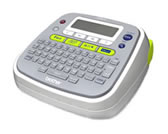
The checks and guides below come from the official manuals for this model.
No matches for this wording. Try a light name, error code or a shorter phrase.
Errors and messages
Messages and indicator states from the manual Low Battery!batteries are weak
Replace the weak batteries or charge the rechargeable batteries fully.
Battery Deadbatteries are nearly empty
Replace the batteries before printing another label.
Invalid!selected numbering or label value is invalid
Choose valid text, numbering, tab length, or label length for this operation.
No Text!no text is available for this command
Enter text or recall a saved label before using this command.
Line Limit!too many lines for the tape width
Remove the extra line or install a wider tape cassette.
No Cassette!tape cassette is missing
Install a compatible tape cassette before printing or feeding.
Cutter Errortape cutter was pressed during printing
Release the cutter lever and leave it untouched while printing.
Text Full!character limit reached
Delete characters to bring the label within the permitted limit.
Text Limit!text exceeds the selected label length
Shorten the label text or choose Auto for label length.
No Frame OK?frame cannot print on this tape width
Confirm printing without a frame, or install tape that supports the selected frame.
OK to Feed?chain Print asks whether to feed the tape
Confirm tape feed when the prompt appears after Chain Print.
Insert 0.47"template needs 0.47-inch tape
Install a 0.47-inch tape cassette for this template.
Wrong Tape!incorrect tape cassette
Install the tape cassette type marked in the guide.
Troubleshooting
Find the problem you are experiencingDisplay remains blankView
Check battery orientation and charge, then check the adapter connection.
Printed label has too much marginView
Set Margin to Half or Narrow to reduce unused tape beside the text.
Label does not print or characters are malformedView
Reseat the tape cassette, replace it if empty, and close the cassette cover.
Settings clear unexpectedlyView
Replace weak batteries; text and formats clear after power has been disconnected for more than three minutes.
Blank horizontal line on printed labelView
Remove the cassette and gently clean the print head with a dry cotton swab.
Label maker stops respondingView
Turn the label maker off, hold Shift and R while pressing Power, then release Power before Shift and R. This reset clears stored text, settings, and files.
Power turns off during printingView
Replace weak batteries, confirm their orientation, and use the specified AC adapter.
Tape will not feed or is stuckView
Route the tape beneath its guides and leave the cutter lever alone while printing.
Clear text and formattingView
Choose Text&Format from the Clear menu to start a new label.
Change the display languageView
Change the language in Initial Settings.