MODEL REFERENCE
MERCUSYS Halo H1200G V1
2 errors · 12 guides

The checks and guides below come from the official manuals for this model.
No matches for this wording. Try a light name, error code or a shorter phrase.
Errors and indicators
Light patterns and messages documented in the manualFind the indicator lights
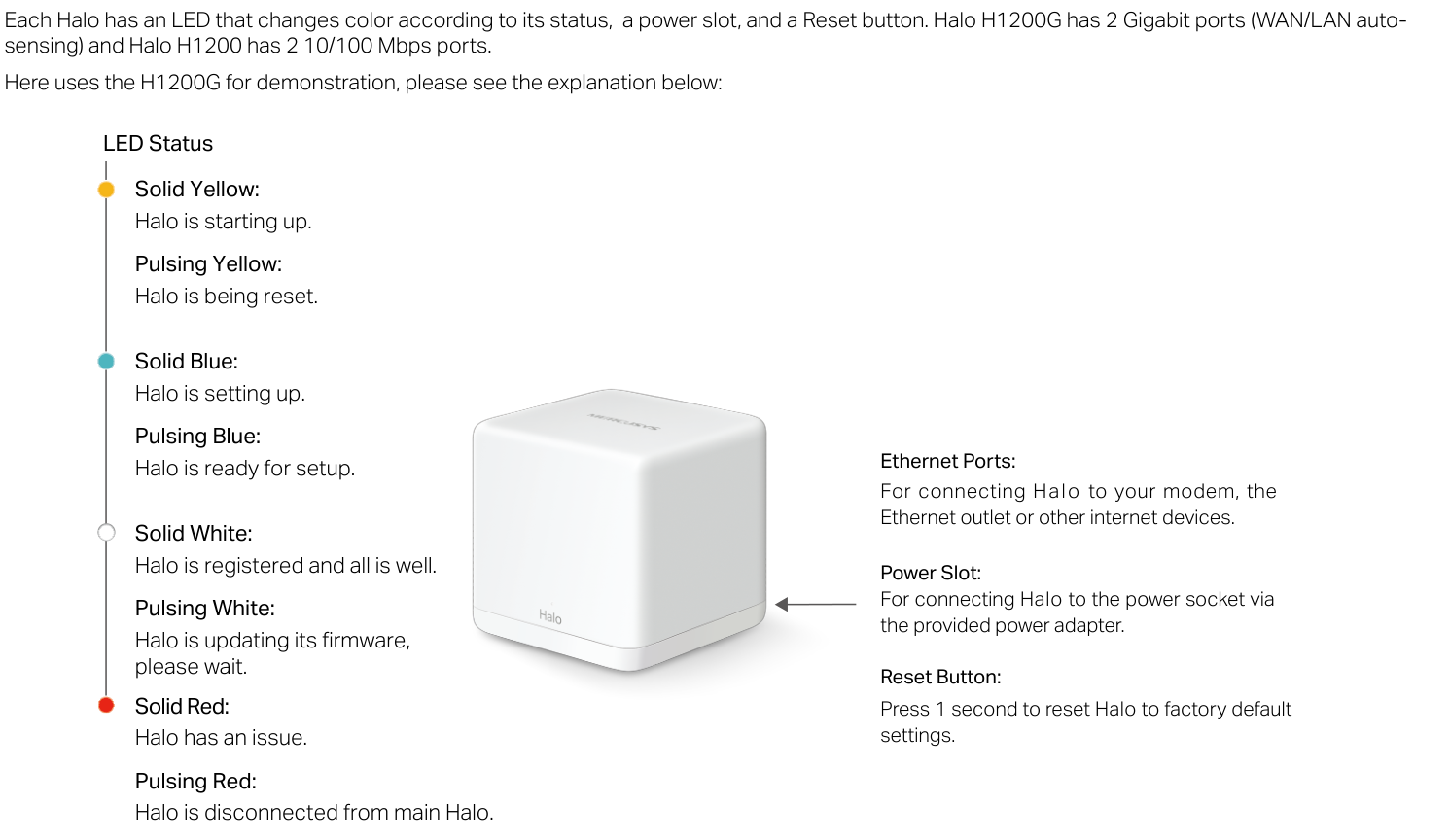
Diagram key
- Solid Yellow: Halo is starting up.
- Pulsing Yellow: Halo is being reset.
- Solid Blue: Halo is setting up.
- Pulsing Blue: Halo is ready for setup.
- Solid White: Halo is registered and all is well.
- Pulsing White: Halo is updating firmware; wait.
- Solid Red: Halo has an issue.
- Pulsing Red: Halo is disconnected from the main Halo.
- Yellow marker: Groups the printed solid and pulsing yellow states.
- Blue marker: Groups the printed solid and pulsing blue states.
- White marker: Groups the printed solid and pulsing white states.
- Red marker: Groups the printed solid and pulsing red states.
- Ethernet Ports: H1200G has two Gigabit WAN/LAN auto-sensing ports; H1200 has two 10/100 Mbps ports. The guide describes Ethernet connections to a modem, Ethernet outlet or other internet devices.
- Power Slot and arrow: Connect to the power socket using the provided adapter. The complete printed arrow belongs to this label.
- Reset Button: Press for 1 second to restore factory default settings.
Solid Redhalo has an issue
- Halo has an issue.
- The complete operation guide supplies no indicator-specific repair sequence.
- Contact MERCUSYS support for technical assistance or service; do not disassemble, repair or modify the device.
Pulsing Redhalo disconnected from the main Halo
- Halo is disconnected from main Halo.
- The complete operation guide supplies no indicator-specific repair sequence.
- Contact MERCUSYS support for technical assistance or service; do not disassemble, repair or modify the device.
Guides
About this guide
Instructions from the manualGuide scope and compatibility7 steps
- This reference uses the exact EU V1 Halo H1200G operation guide linked by MERCUSYS.
- Features vary by model, software, region and ISP; its illustrated screens and descriptions are examples.
- Halo H-series and S-series units cannot work together.
- Seamless roaming requires 802.11k/v/r clients and may require additional setup; performance varies by client.
- MU-MIMO requires compatible clients.
- Maximum wireless signal rates are physical IEEE rates; actual throughput, coverage and connected-device counts are not guaranteed and depend on network conditions, client limitations, building materials, obstacles, traffic volume and density, and client location.
- Use MERCUSYS support for technical help; product-specific information is on its official product page.
Appearance
Instructions from the manualRead all eight indicator states4 steps
- Solid yellow means starting up; pulsing yellow means being reset.
- Solid blue means setting up; pulsing blue means ready for setup.
- Solid white means registered and all is well; pulsing white means updating firmware, so wait.
- Solid red means a Halo issue; pulsing red means disconnected from the main Halo.
Connections and factory reset4 steps
- Halo H1200G has two Gigabit WAN/LAN auto-sensing ports; Halo H1200 has two 10/100 Mbps ports.
- The guide describes Ethernet connections to a modem, Ethernet outlet or other internet devices.
- Connect the power slot to a power socket with the provided adapter.
- Press Reset for 1 second to restore factory default settings.
Set up your halo
Instructions from the manualSet up and expand the Halo network8 steps
- Download MERCUSYS from Google Play or the Apple App Store, or scan the guide’s QR code, and install the app on a phone or tablet.
- Open the app and log in with your Mercusys ID.
- If you do not have one, tap Sign Up and follow the app.
- Tap LET’S BEGIN and follow the app’s ordered instructions to connect and configure Halo.
- After completion, connect client devices to the Halo network.
- Use the top-right + button to add more Halos.
- Power up other Halos in the pack; they automatically join the mesh network within 2 minutes.
- For Halos from different packs, click + in the app to add them to the network.
Rf exposure information
Instructions from the manualEU radio placement and exposure5 steps
- Keep the unit 20 cm from the body under the stated EU RF-exposure conditions.
- For 5150–5250 MHz, indoor use is inside buildings only; installations and use inside road vehicles and train carriages are prohibited.
- The band notice permits limited outdoor use only without attachment to a fixed installation, vehicle exterior, fixed infrastructure or fixed outdoor antenna; UAS use is limited to 5170–5250 MHz.
- Great Britain has a separate indoor-only restriction; keep that regional limitation and all safety guidance.
- The guide lists 2400–2483.5 MHz at 20 dBm and 5150–5250 MHz at 23 dBm maximum transmitted power.
Uk declaration of conformity
Instructions from the manualGreat Britain indoor restrictionView
Use the device only indoors in Great Britain. The UK declaration is available from MERCUSYS support.
Safety information
Instructions from the manualSafe use and when to stop10 steps
- Keep the device away from water, fire, humidity and hot environments.
- Do not disassemble, repair or modify it.
- Contact MERCUSYS if service is needed.
- Do not use damaged chargers or USB cables, unapproved chargers, or the device where wireless equipment is prohibited.
- Install the adapter near the equipment where it remains easily accessible.
- Use only manufacturer-provided power supplies from the original package; ask MERCUSYS if unsure.
- Operate at 0–40°C (32–104°F).
- Keep both product and adapter more than 15 cm (6 inches) from pacemakers and other implanted medical devices.
- If interference is suspected, switch the product off and consult the physician for that medical device.
- Read and follow all safety information and use the product with care; improper use can cause accidents or damage.
Explanation of the symbols on the product label
Instructions from the manualRead the complete generic product-label key6 steps
- The product label is underneath the device.
- Symbols vary by product; this generic key does not establish which symbols appear on an individual unit.
- The key explains Class II equipment, Class II equipment with functional earthing, alternating current, DC voltage, polarity of output terminals, indoor use only and dangerous voltage.
- The continuation explains electric-shock caution, energy efficiency marking, protective earth, earth, frame/chassis, functional earthing, hot-surface caution, caution, operator’s manual, standby, ON/OFF push-push, fuse and a fuse in neutral N.
- It continues with WEEE recycling, avoiding high-volume listening for long periods, disconnecting all power plugs, m for mini-gap construction, µ for a micro-gap US switch or micro-gap/micro-disconnection outside the US, and ε for a semiconductor switch without a contact gap.
- Preserve the US/non-US qualification.
Recycle electrical equipment2 steps
- Handle the WEEE-marked product under European Directive 2012/19/EU so that recycling or dismantling minimizes environmental impact.
- Give it to a competent recycling organization or return it to the retailer when buying new electrical or electronic equipment.
安全諮詢及注意事項
Instructions from the manualNCC and BSMI cleaning and ventilation precautions8 steps
These additional precautions appear in the NCC Notice & BSMI Notice block of the shared guide.
- The NCC/BSMI safety block says to use the original power supply or the power type marked on the product.
- Before cleaning, unplug the power cable.
- Do not clean with liquids, spray cleaners or a wet cloth.
- Protect the product from moisture and do not spill water or other liquids on it.
- Keep ventilation slots and openings uncovered to prevent overheating.
- Keep away from heat sources; do not put it in an enclosed location without normal ventilation.
- Do not open the housing or repair it yourself.
- For a fault, contact the manufacturer or its agent.
Specifications
Instructions from the manualEU V1 wireless and software reference12 steps
- Wireless standards are IEEE 802.11 a/n/ac on 5 GHz and b/g/n on 2.4 GHz.
- Physical signal rates are 867 Mbps on 5 GHz and 300 Mbps on 2.4 GHz.
- Mesh protocol is 802.11k/v/r.
- EIRP is below 20 dBm on 2.4 GHz and below 23 dBm on 5 GHz.
- Reception sensitivities: 2.4 GHz—11g 6 Mbps −96 dBm, 11g 54 Mbps −78 dBm, 11n HT20 MCS7 −76 dBm and HT40 MCS7 −73 dBm; 5 GHz—11a 6 Mbps −95 dBm, 11a 54 Mbps −77 dBm, 11ac VHT20 MCS8 −72 dBm, VHT40 MCS9 −67 dBm and VHT80 MCS9 −63 dBm.
- Working modes are Router and Access Point.
- WAN types are Dynamic IP, Static IP, PPPoE, L2TP and PPTP.
- DHCP supports server and client; protocols support IPv4 and IPv6.
- There is one 2.4 GHz and one 5 GHz guest network.
- Listed features are Parental Controls, QoS, Reporting, Assisted Setup, Address Reservation, Port Forwarding, Mercusys DDNS, VLAN, IPv6 and LED Control.
- Management is local, remote and multi-manager; wireless security is WPA-PSK/WPA2-PSK.
- Feature availability remains subject to model, software and region as the operation guide states.
EU V1 hardware, environment and two-pack contents9 steps
- Halo H1200G works as a router to access the internet; Halo H1200 works as a satellite to expand coverage.
- Halo H1200G has two Gigabit WAN/LAN auto-sensing ports; Halo H1200 has two 10/100 Mbps ports.
- The button is Reset.
- Dimensions are 88 × 88 × 88 mm (3.5 × 3.5 × 3.5 inches).
- Operate at 0–40°C (32–104°F), with 10–90% non-condensing operating humidity; storage humidity is 5–90% non-condensing.
- The two-pack contains one Halo H1200G, one Halo H1200, one RJ45 Ethernet cable, two power adapters and one quick installation guide.
- Roaming requires 802.11k/v/r clients and may need additional setup; MU-MIMO requires compatible clients.
- Physical signal rates do not guarantee throughput, coverage or device count, which depend on network conditions, client limitations, building materials, obstacles, traffic volume/density and client location.
- H-series and S-series cannot work together; Halo H1200G supports other H-series units for a mesh network.
Model details
Model and compatibility
- Ethernet ports
- Halo H1200G has two Gigabit WAN/LAN auto-sensing ports; Halo H1200 has two 10/100 Mbps ports.
- Factory reset
- Press Reset for one second to restore factory default settings.
- Operating temperature
- 0–40°C (32–104°F).