MODEL REFERENCE
TP-Link Deco BE22 V1
8 errors · 7 troubleshooting topics · 9 guides

The checks and guides below come from the official manuals for this model.
No matches for this wording. Try a light name, error code or a shorter phrase.
Errors and indicators
Light patterns and messages documented in the manualFind the indicator lights
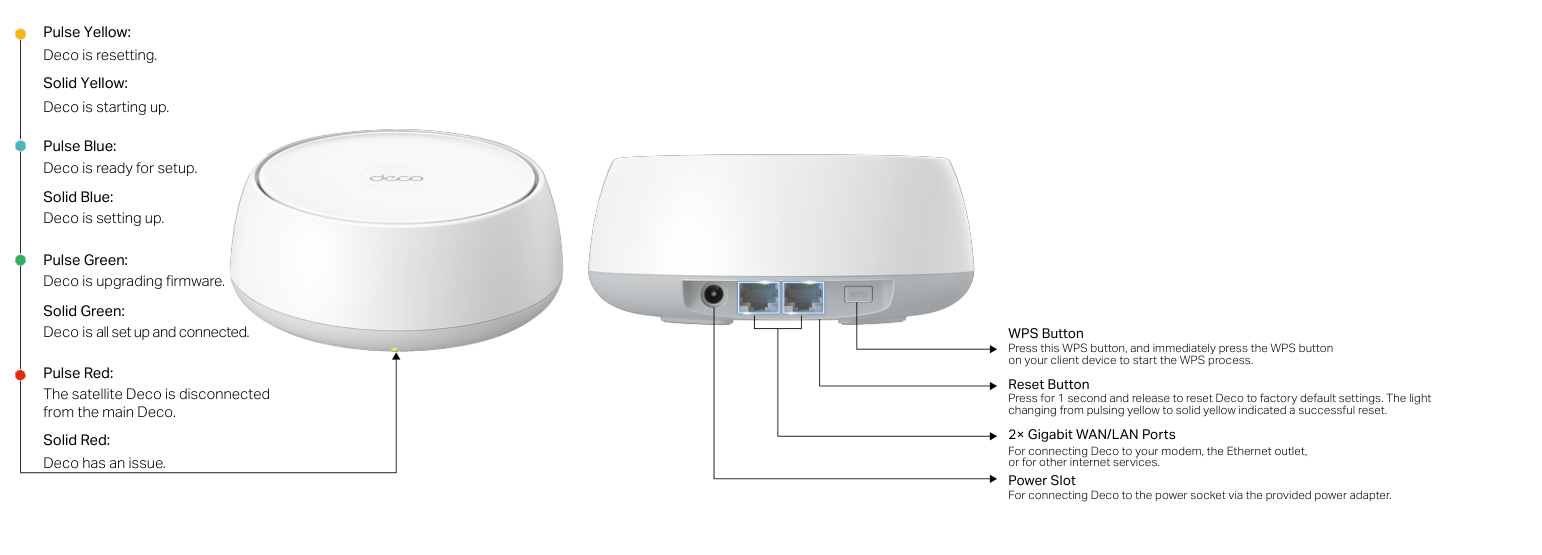
Diagram key
- Pulse Yellow: Deco is resetting.
- Solid Yellow: Deco is starting up.
- Pulse Blue: Deco is ready for setup.
- Solid Blue: Deco is setting up.
- Pulse Green: Deco is upgrading firmware.
- Solid Green: Deco is all set up and connected.
- Pulse Red: The satellite Deco is disconnected from the main Deco.
- Solid Red: Deco has an issue.
- WPS Button: Press WPS, then immediately press WPS on the client device.
- Reset Button: Press for 1 second and release to restore factory defaults; pulsing yellow changing to solid yellow indicates success.
- Two Gigabit WAN/LAN Ports: Connect to a modem, Ethernet outlet or other internet service.
- Power Slot: Use the provided power adapter to connect to a power socket.
Pulse Yellowdeco is resetting
Deco is resetting.
Solid Yellowdeco is starting up
Deco is starting up.
Pulse Bluedeco is ready for setup
Deco is ready for setup.
Solid Bluedeco is setting up
Deco is setting up.
Pulse Greendeco is upgrading firmware
Deco is upgrading firmware.
Solid Greendeco is all set up and connected
Deco is all set up and connected.
Pulse Redthe satellite Deco is disconnected from the main Deco
The satellite Deco is disconnected from the main Deco.
Solid Reddeco has an issue
Deco has an issue.
Troubleshooting
Find the problem you are experiencingMain Deco setup: We couldn’t find Deco1 check
- Main Deco setup: We couldn’t find Deco
- Use TP-Link FAQ 2239 or its main-Deco discovery video, as linked from the official user guide. If the problem persists, contact TP-Link support.
Satellite setup: We couldn’t find another Deco1 check
- Satellite setup: We couldn’t find another Deco
- Use TP-Link FAQ 1447 or its satellite-Deco discovery video, as linked from the official user guide. If the problem persists, contact TP-Link support.
Setup stuck on Testing Internet Connection1 check
- Setup stuck on Testing Internet Connection
- Use TP-Link FAQ 2239 or its Testing Internet Connection video linked from the official user guide. If the problem persists, contact TP-Link support.
Wireless devices cannot connect to Deco1 check
- Wireless devices cannot connect to Deco
- Use TP-Link FAQ 2718, linked from the official user guide. If the problem persists, contact TP-Link support.
Deco suddenly loses internet access1 check
- Deco suddenly loses internet access
- Use TP-Link FAQ 2428, linked from the official user guide. If the problem persists, contact TP-Link support.
Finding a suitable spot for Deco1 check
- Finding a suitable spot for Deco
- Use TP-Link FAQ 1446, linked from the official user guide. If the problem persists, contact TP-Link support.
Deco app does not work properly1 check
- Deco app does not work properly
- Use TP-Link FAQ 1456, linked from the official user guide. If the problem persists, contact TP-Link support.
Guides
Appearance
Instructions from the manualReset Deco to factory defaultsView
Press the Reset button for 1 second and release to restore factory default settings. Pulsing yellow changing to solid yellow indicates a successful reset.
Connect a client using the WPS buttonView
Press the WPS button on Deco. Immediately press the WPS button on your client device to start WPS.
Set up your deco
Instructions from the manualSet up the Deco network19 steps
- Download TP-Link Deco from Google Play or the App Store, or scan the QR code in the manual.
- Install it on your Android or iOS smartphone or tablet.
- Open the app and log in with your TP-Link ID, or create one first.
- If you forgot your login password, tap Forgot Password? and follow the app to reset it.
- In the app, tap + at the top right of the homepage and select Create a Network.
- Plug in Deco and wait for its LED to pulse blue; your phone or tablet will connect automatically.
- You may turn on Bluetooth on the phone or tablet in advance for quicker setup.
- Power off the modem, connect Deco to it and power the modem on again.
- The illustrated setup specifically says to restart the modem by turning it off and on.
- If you have no modem, connect Deco directly to the Ethernet outlet; the illustrated alternative permits a network-providing router or switch LAN port.
- Select or customize the location for Deco; this becomes its name.
- Select the internet connection type and enter its information.
- Contact your internet service provider if unsure.
- Create a Wi-Fi network name and password for connecting devices.
- The illustrated password rule requires at least 8 characters and recommends a combination of letters, numbers and symbols.
- Set an automatic update time for the latest firmware.
- The illustrated note says that if anyone uses the internet at that time, the update is rescheduled for the next day.
- Setup is complete; connect devices to the Deco network.
- If other Decos are included, place them suitably and plug them in; they join the network automatically.
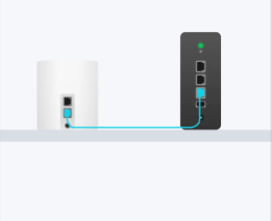
Diagram key
- Deco: The Deco unit at left connects through a Gigabit WAN/LAN port.
- Modem: The modem at right supplies the internet connection.
- Turquoise cable: The Ethernet cable joins Deco to the modem.
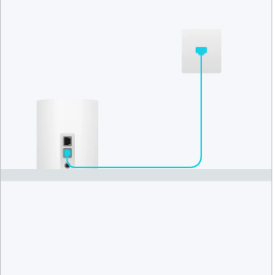
Diagram key
- Deco: The Deco unit at lower left connects through a Gigabit WAN/LAN port.
- LAN port or internet outlet: The upper right endpoint represents the network-providing LAN port; the illustrated text names a router, switch or internet outlet.
- Turquoise cable: The Ethernet cable joins the two endpoints.
Rf exposure information
Instructions from the manualMaintain the RF separation distanceView
Keep Deco at least 20 cm from your body.
National restrictions
Instructions from the manualUse Deco indoors in the EU and UK5 steps
- Use Deco indoors only in EU member states, EFTA countries, Northern Ireland and Great Britain.
- For 5150–5250 MHz, indoor use is inside buildings only and excludes road vehicles and train carriages.
- For 5250–5350 MHz, installations and use in road vehicles, trains and aircraft are prohibited and outdoor use is prohibited.
- For 5470–5725 MHz, installations and use in road vehicles, trains and aircraft, and use for unmanned aircraft systems, are prohibited; outdoor use including in road vehicles is prohibited.
- The general 5150–5250 MHz limited-outdoor wording does not override this model’s indoor-only national restriction.
Safety information
Instructions from the manualSafe operation and when to stop10 steps
- Keep Deco away from water, fire, humidity and hot environments.
- Do not disassemble, repair or modify it; contact TP-Link for service.
- Do not use damaged chargers or USB cables, or chargers other than those recommended.
- Use only manufacturer-supplied power supplies in the original package; contact TP-Link with questions.
- Do not use the device where wireless devices are prohibited.
- Keep its adapter near the equipment and easily accessible.
- Operate at 0–40°C (32–104°F).
- Keep Deco and its power adapter more than 15 cm (6 inches) from pacemakers and other implanted medical devices.
- If interference is suspected, turn Deco off and consult your physician for advice specific to the implanted device.
- Read and follow the safety information and use the product carefully; improper use can cause accidents or damage.
Recycling
Instructions from the manualRecycle electrical and electronic equipment2 steps
- The crossed-out wheeled-bin marking identifies WEEE collection.
- Give the product to a competent recycling organization or to a retailer when buying new electrical or electronic equipment.
安全諮詢及注意事項
Instructions from the manualCleaning and ventilation in the NCC/BSMI safety notice7 steps
- The NCC/BSMI safety notice specifies using the original power supply or the power type marked on the product.
- Disconnect power before cleaning.
- Do not use liquid cleaners, spray cleaners or a wet cloth.
- Protect against moisture and do not splash water or other liquids onto the product.
- Do not block or cover ventilation slots and openings.
- Keep the product away from heat sources; do not put it in an enclosed space without proper ventilation.
- Do not open the housing or repair it yourself; contact the manufacturer or agent if it fails.
Fcc compliance information statement
Instructions from the manualRadio or television interference: FCC notice4 steps
- In the FCC notice, determine whether the equipment causes radio or television interference by turning it off and on.
- Try one or more of these measures: reorient or relocate the receiving antenna; increase separation between equipment and receiver; connect the equipment to an outlet on a different circuit from the receiver; consult the dealer or an experienced radio/TV technician.
- Unauthorized modifications can void authority to operate the equipment.
- The FCC exposure notice prohibits co-location or joint operation with another antenna or transmitter and requires at least 20 cm separation from all persons.
Model details
Model and compatibility
- Ports and controls
- Two Gigabit WAN/LAN ports, WPS button, power slot, Reset button and status LED.
- Operating temperature
- 0–40°C (32–104°F).
Related reviewed instructions
Manuals and sources
- TP-Link operation manual
- TP-Link model support and details
- TP-Link manual download listing
- Troubleshooting resource linked by the official BE22 user guide
- Manufacturer-linked troubleshooting resource: 2239
- Manufacturer-linked troubleshooting resource: 2428
- Manufacturer-linked troubleshooting resource: 1447
- Manufacturer-linked troubleshooting resource: 2718
- Manufacturer-linked troubleshooting resource: 1446
- Manufacturer-linked troubleshooting resource: 1456
- Manufacturer-linked troubleshooting resource: 2HYuEYS9XJM
- Manufacturer-linked troubleshooting resource: iVgDzoo16T4
- Manufacturer-linked troubleshooting resource: OSUrGdWH-i0