MODEL REFERENCE
TP-Link Deco W7200 V2.60
8 errors · 7 troubleshooting topics · 42 guides
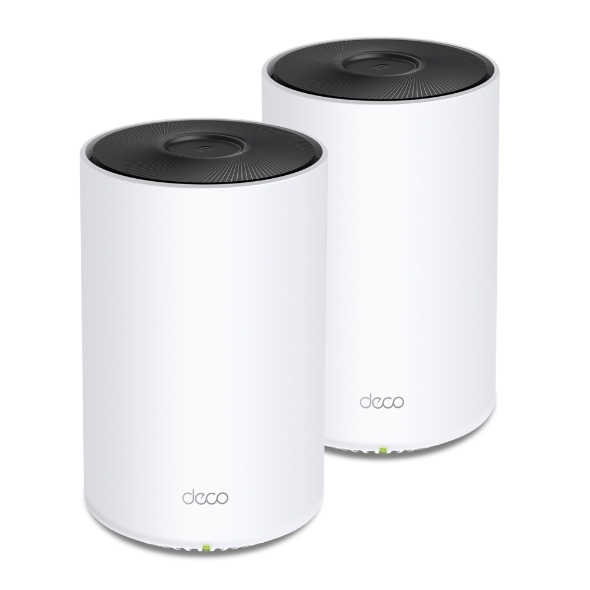
The checks and guides below come from the official manuals for this model.
No matches for this wording. Try a light name, error code or a shorter phrase.
Errors and indicators
Light patterns and messages documented in the manualFind the indicator lights
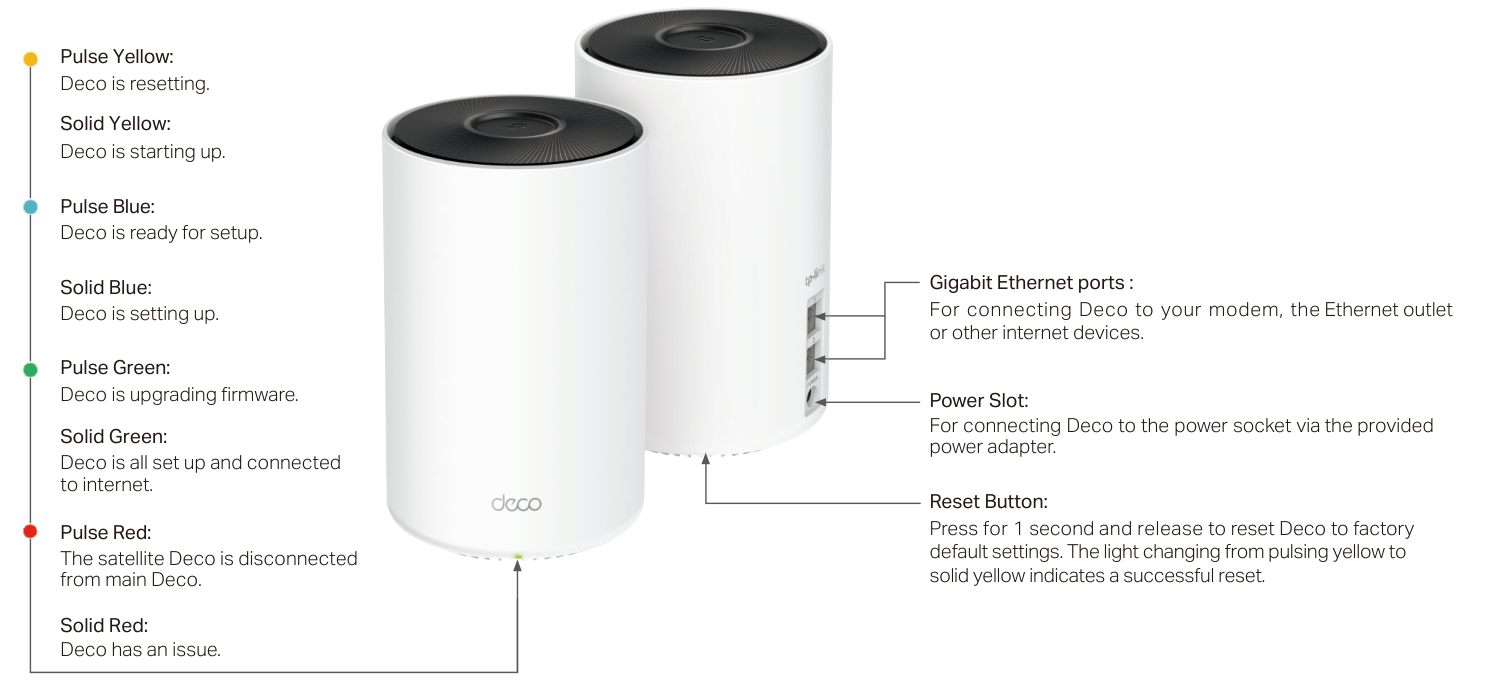
Diagram key
- Pulse Yellow: Deco is resetting.
- Solid Yellow: Deco is starting up.
- Pulse Blue: Deco is ready for setup.
- Solid Blue: Deco is setting up.
- Pulse Green: Deco is upgrading firmware.
- Solid Green: Deco is all set up and connected to internet.
- Pulse Red: The satellite Deco is disconnected from main Deco.
- Solid Red: Deco has an issue.
- Gigabit Ethernet ports: The two ports connect Deco to a modem, Ethernet outlet or other internet devices.
- Power Slot: Connect to a power socket using the provided power adapter.
- Reset Button: Press for 1 second and release to restore defaults; pulsing yellow changing to solid yellow indicates successful reset.
Pulse Yellowdeco is resetting
Deco is resetting.
Solid Yellowdeco is starting up
Deco is starting up.
Pulse Bluedeco is ready for setup
Deco is ready for setup.
Solid Bluedeco is setting up
Deco is setting up.
Pulse Greendeco is upgrading firmware
Deco is upgrading firmware.
Solid Greendeco is all set up and connected to internet
Deco is all set up and connected to internet.
Pulse Redthe satellite Deco is disconnected from main Deco
The satellite Deco is disconnected from main Deco.
Solid Reddeco has an issue
Deco has an issue.
Troubleshooting
Find the problem you are experiencingMain Deco cannot be found1 check
- Main Deco cannot be found
- Use the manufacturer guide FAQ 2239 or its linked setup video 2HYuEYS9XJM. If the problem remains, contact TP-Link support.
Another Deco cannot be found1 check
- Another Deco cannot be found
- Use the manufacturer guide FAQ 1447 or its linked setup video iVgDzoo16T4. If the problem remains, contact TP-Link support.
Setup stops at Testing Internet Connection1 check
- Setup stops at Testing Internet Connection
- Follow the manufacturer-linked setup video OSUrGdWH-i0. If the problem remains, contact TP-Link support.
Wireless devices cannot connect1 check
- Wireless devices cannot connect
- Refer to manufacturer guide FAQ 2718. If the problem remains, contact TP-Link support.
Deco suddenly loses internet1 check
- Deco suddenly loses internet
- Refer to manufacturer guide FAQ 1454. If the problem remains, contact TP-Link support.
Find a suitable Deco location1 check
- Find a suitable Deco location
- Refer to manufacturer guide FAQ 1446. If the problem remains, contact TP-Link support.
Deco app does not work properly1 check
- Deco app does not work properly
- Refer to manufacturer guide FAQ 1456. If the problem remains, contact TP-Link support.
Guides
Appearance
Instructions from the manualReset Deco to factory defaultsView
Press the Reset button for 1 second and release. The light changing from pulsing yellow to solid yellow indicates a successful reset.
Set up your deco
Instructions from the manualSet up the Deco network14 steps
- Download TP-Link Deco from Google Play or the Apple App Store, or scan the manual QR code.
- Install it on an Android or iOS smartphone or tablet.
- Open the app and log in with a TP-Link ID, or sign up first.
- If the login password is forgotten, tap Forgot password? and follow the app.
- Choose the Deco model.
- Power off the modem.
- Connect Deco to the modem and power both on.
- Without a modem, connect the Ethernet outlet directly to Deco.
- The illustrated connection uses the modem LAN port and either Deco Ethernet port.
- Select a location, or choose Custom to create a location not listed.
- Select the internet connection type and enter the information; contact the internet service provider if unsure.
- Set a network name and password used to connect devices to Wi-Fi.
- Connect devices to the Deco Wi-Fi to continue setup.
- Add more Decos or complete setup and connect all devices to the Deco network.
Add more decos
Instructions from the manualAdd more Decos3 steps
- On the Overview page, tap the plus icon.
- Select the model to add and follow the app instructions to complete setup.
- After setup, tap the network overview globe icon to find the added Decos.
Dashboard
Instructions from the manualUse the app dashboardView
After setup, use the network overview tab to see network status. Use HomeShield for enhanced security or the four-square More tab for additional features.
Check deco status
Instructions from the manualCheck Deco statusView
In Overview, tap the network globe icon to check all Decos. Tap a unit to see its details. Tap the Deco unit in its details to change or customize its location.
Manage connected devices
Instructions from the manualManage connected devices3 steps
- In Overview, tap a client in the Devices list for details.
- Tap the settings icon to manage its settings.
- Tap Belongs to to add a unique profile and manage the device’s online activities.
Create new networks
Instructions from the manualCreate a network from OverviewView
On Overview, tap the network-selector arrow and choose Create New Network. Follow the app instructions to complete setup.
Wi-fi detective
Instructions from the manualFind devices using Wi-Fi DetectiveView
On Overview, open the Menu. Tap Wi-Fi Detective. Tap Discover to find all devices connected to the current Wi-Fi network and identify potential risks.
Remove/reboot deco
Instructions from the manualRemove or reboot a Deco4 steps
- Tap the network overview globe icon to check all Deco units.
- Tap a Deco for details.
- Open its three-dot menu to remove or reboot it.
- If the LED does not pulse blue after Remove, use the Reset button as described in Appearance.
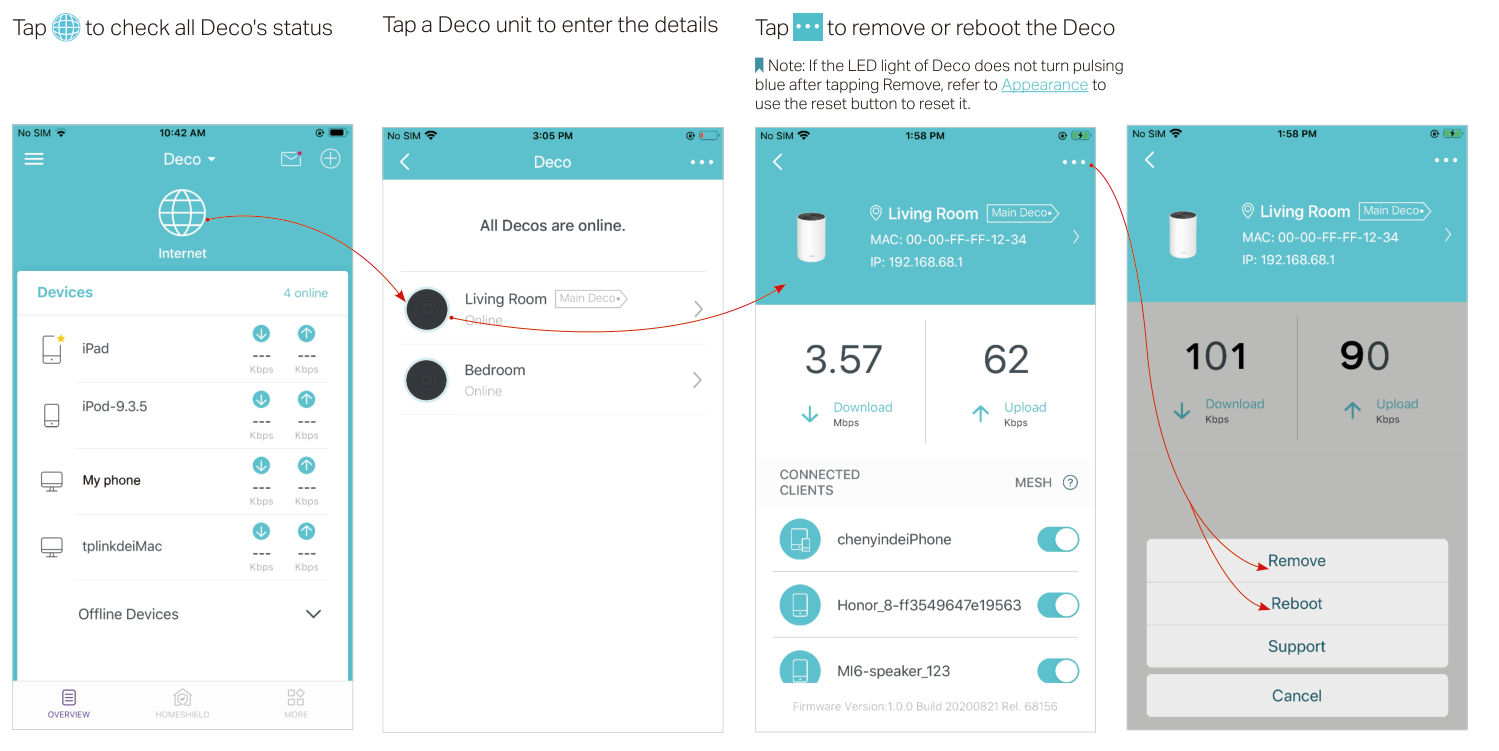
Diagram key
- Network overview globe: Tap to check all Deco units.
- Selected Deco unit: Tap the unit to open its details.
- Three-dot menu: Open the menu for the selected unit.
- Remove: Remove this Deco; if the LED does not pulse blue afterward, use the reviewed Reset instructions.
- Reboot: Restart the selected Deco.
Homeshield
Instructions from the manualUse HomeShield features8 steps
- HomeShield provides free basic and charged Pro features.
- Consult the product support page’s HomeShield User Guide for use and upgrades.
- Scan the network regularly for potential risks.
- Pro Real-Time Protection can block malicious websites, protect the network and applications from external attacks and vulnerabilities, prevent infected devices sending sensitive information or threats outside the network, and identify and monitor IoT devices as they join.
- Create family profiles and assign devices; set when and how long each person can use the internet, block inappropriate content and pause internet access as needed.
- Use QoS to prioritize a device for a set duration, such as a laptop for one hour during a video call.
- Review weekly or monthly usage reports, including security threats and visited content.
- Upgrade to Pro for additional features after checking the Basic/Pro details.
Wi-fi settings
Instructions from the manualChange and share Wi-Fi settings4 steps
- Open More, then Wi-Fi.
- Manage the main network name and password.
- Enable a separate guest network to protect the security and privacy of the main network.
- Shake the mobile device to share the network details with family or friends.
Blacklist
Instructions from the manualManage the blacklistView
Open More, then Blacklist. Add clients or other devices to the blacklist to prevent access to the network. Manage the blacklist, including removing entries when appropriate.
Online update
Instructions from the manualUpdate Deco firmware3 steps
- Open More, then Update Deco.
- Follow the app to update to the latest firmware when prompted for better and more stable network performance.
- If an update fails, reboot the main Deco, move the satellite closer to it, and try the update again.
Advanced features
Instructions from the manualView or change IPv4 internet settingsView
Open More, then Advanced. View IPv4 details or change the internet connection type.
Enable an IPv6 connectionView
Open More, then Advanced. Enable IPv6 to set up an IPv6 internet connection.
Add IPv6 firewall rulesView
Open More, then Advanced. Add IPv6 firewall rules to allow specific devices access to specified services.
Modify LAN IPView
Open More, then Advanced. Modify the LAN IP to avoid an IP address conflict.
Change DHCP settingsView
Open More, then Advanced. Change the DHCP server settings.
Enable IPTV or VLANView
Open More, then Advanced. Enable IPTV/VLAN mode to support IPTV services.
Enable MAC CloneView
Open More, then Advanced. Enable MAC Clone if Deco fails to connect to the internet; the manual refers to TP-Link FAQ 2925 for details.
Reserve a device IP addressView
Open More, then Advanced. Reserve an IP address for a specific device to recognize and manage it more easily.
Set up port forwardingView
Open More, then Advanced. Set up port forwarding rules to make devices on the network accessible over the internet with safety.
Register TP-Link DDNSView
Open More, then Advanced. Register a TP-Link DDNS domain name to access the router and local servers by domain name.
Enable SIP ALGView
Open More, then Advanced. Enable SIP ALG to communicate with SIP servers through NAT.
Enable UPnPView
Open More, then Advanced. Enable UPnP to let the local network dynamically open ports for applications such as gaming.
Enable Fast RoamingView
Open More, then Advanced. Enable Fast Roaming for wireless devices to switch between Decos seamlessly.
Enable BeamformingView
Open More, then Advanced. Enable Beamforming to concentrate Wi-Fi signals toward connected devices for stronger connections.
Control the Deco LEDView
Open More, then Advanced. Toggle LED off to turn off its light, or configure Night Mode to turn it off only at bedtime.
Change operating mode3 steps
- Open More, then Advanced.
- Change the operating mode.
- In Access Point mode, advanced features including HomeShield, IPv4, Address Reservation, Port Forwarding and DHCP server are unavailable.
Set connection alertsView
Open More, then Advanced. Set connection alerts for notifications when clients connect to or disconnect from Deco.
Set app notificationsView
Open More, then Advanced. Set notifications for alerts in the notification bar. If Notifications shows Disabled, enable it in Settings > Notifications on the mobile device.
Wps
Instructions from the manualConnect a client with app WPSView
Open More, then WPS. Tap the WPS icon in the Deco app, then activate WPS on the client. The success screen indicates that the device has connected without entering a password.
Weekly/monthly reports
Instructions from the manualReview or switch usage reportsView
Open More, then Reports. View weekly or monthly usage, including security threats and total connected devices each day. Tap the report settings icon to enable or disable reports.
Managers
Instructions from the manualManage other network managersView
Each manager must have their own TP-Link ID. Open More, then Managers. Add other accounts as managers, set their privileges, or remove managers.
Fcc compliance information statement
Instructions from the manualAddress radio or TV interference3 steps
- Switch the equipment off and on to determine whether it causes radio or TV interference.
- Try reorienting or relocating the receiving antenna, increasing separation between the equipment and receiver, connecting to an outlet on a different circuit, or consulting a dealer or experienced radio/TV technician.
- Unauthorized changes or modifications may void authority to operate the equipment.
Fcc rf radiation exposure statement
Instructions from the manualUS FCC radio separationView
For mobile configurations, install transmitter antennas at least 20 cm from all persons. Do not co-locate or operate the device and antenna with another antenna or transmitter.
Canadian compliance statement
Instructions from the manualCanadian indoor use and separation2 steps
- In Canada, operation in the 5150–5250 MHz band is indoors only to reduce interference to co-channel mobile satellite systems.
- Install and operate with at least 20 cm between the radiator and the body.
Ncc notice & bsmi notice:
Instructions from the manualRegional NCC interference precautions5 steps
- Do not change frequency, increase power or alter original design characteristics or functions without approval.
- Do not affect flight safety or lawful communications.
- If interference occurs, stop immediately and correct it before resuming.
- Accept interference from lawful communications and industrial, scientific and medical radio equipment.
- Avoid affecting nearby radar systems.
安全諮詢及注意事項
Instructions from the manualRegional cleaning and ventilation precautions8 steps
- Use the power type marked on the product.
- Disconnect power before cleaning.
- Do not use liquid or spray cleaners or a wet cloth.
- Keep moisture, water and other liquids away.
- Do not cover or block ventilation slots and openings.
- Keep away from heat sources; do not place in an enclosed location without normal ventilation.
- Do not open the housing or repair it yourself.
- Contact the manufacturer or agent if it fails.
Safety information
Instructions from the manualSafe operation and when to stop7 steps
- Keep the device away from water, fire, humidity and hot environments.
- Do not disassemble, repair or modify it; contact TP-Link for service.
- Do not use damaged chargers or USB cables, or chargers other than recommended.
- Do not use it where wireless devices are prohibited.
- Install the adapter near the equipment and keep it accessible.
- Use only manufacturer-supplied power supplies from the original package; contact TP-Link with questions.
- Read and follow all safety information and handle the product carefully; improper use may cause accidents or damage.
Explanation of the symbols on the product label
Instructions from the manualRecycle electrical equipmentView
Give the product to a competent recycling organization, or to a retailer when buying new electrical or electronic equipment, for WEEE recycling or dismantling to minimize environmental impact.
Model details
Model and compatibility
- Ports and controls
- Status LED, two Gigabit Ethernet ports, power slot and Reset button. Use the provided power adapter.
- HomeShield plans
- Basic HomeShield features are free; Pro features are charged.
Before setup
Remain online using Wi-Fi or mobile data throughout app download and login. This reference follows the US V2.60 guide. App screens are illustrative and vary by software version.
Related reviewed instructions
Manuals and sources
- TP-Link operation manual
- TP-Link model support and details
- TP-Link manual download listing
- Exact US V2.6 datasheet
- Shared quick installation guide; indoor model instructions
- Generic Deco app guide; features vary by model and software
- Manufacturer-linked reference: 2239
- Manufacturer-linked reference: 1447
- Manufacturer-linked reference: 2718
- Manufacturer-linked reference: 1454
- Manufacturer-linked reference: 1446
- Manufacturer-linked reference: 1456
- Manufacturer-linked reference: 2925
- Manufacturer-linked reference: support
- Manufacturer-linked reference: 2HYuEYS9XJM
- Manufacturer-linked reference: iVgDzoo16T4
- Manufacturer-linked reference: OSUrGdWH-i0